


Soon after connecting an AI assistant to a research platform through Model Context Protocol (MCP), you’ll probably ask it to do something the platform’s MCP doesn’t support. The issue is not your prompt, but more likely the action—or the tool required to perform it—may not be available through the particular platform’s MCP server.
That’s why “supports MCP” tells you surprisingly little about what that enables for you and your AI Assistant. MCP standardizes how AI connects to another system but it does not prescribe which research capabilities that system must make available.
To understand what a connected assistant can do, you’ll have to check out the list of tools.
What an MCP "tool" actually is
As we explained in a recent article, an MCP server can expose a set of predefined actions called tools to a connected AI assistant.
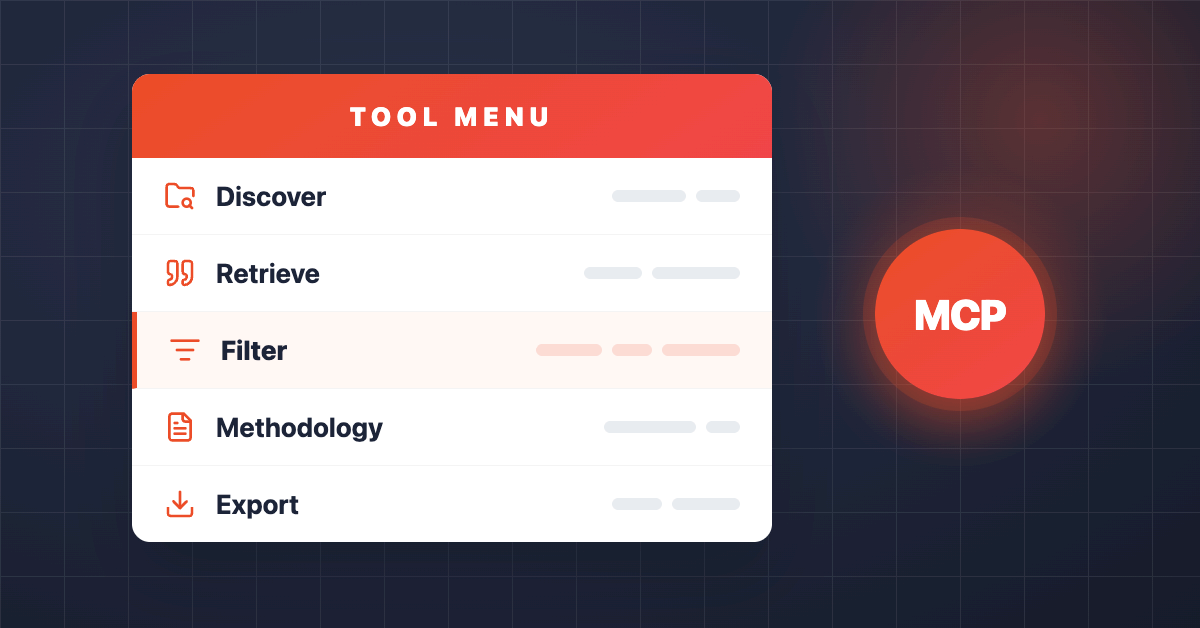
A tool is a specific action that the application’s developers have chosen to make available through the MCP connection. A tool might enable your AI to search for studies, retrieve the responses to a question, inspect how a survey was authored or export a filtered dataset. Each tool comes with a definition that tells the assistant what the tool does and what information it needs to use it. Some also define the structure of the result that should come back.
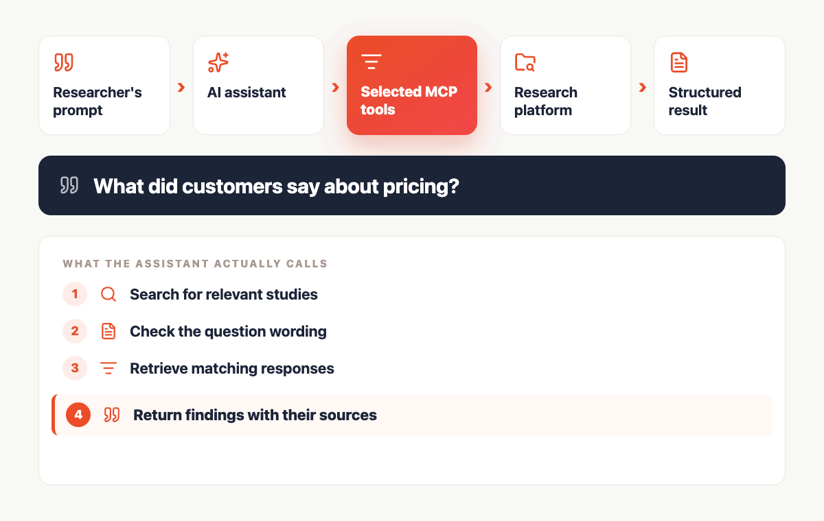
When you ask a question in plain language, the assistant sorts through its available tools, selects the ones it thinks will help get you what you need and reasons over the results.
It’s like ordering at a restaurant. If the dish isn’t on the menu, describing it to the waiter in more detail won’t help. And just like at a restaurant, the current menu isn’t necessarily permanent. It can change as the MCP server evolves, and different users may see different tools depending on their permissions.
Here's an illustration of what it could look like in practice:
"Supports MCP" is not a feature, the tools are
Two vendors can both announce MCP support while enabling wildly different capabilities. That’s because MCP provides a standard for how an assistant connects, not what it can do once connected.
One platform might expose a single tool for exporting study results. Technically, that is MCP support. But in practice, it may create a less-than-ideal workflow: export the data first, then analyze it elsewhere or worse, retrieve far more information than the prompt actually requires.
Another platform might let the AI assistant search across studies by topic, retrieve responses to one specific question, filter responses by keyword, and check the original question wording before providing an answer.
Same MCP protocol. Completely different research experience.
So when a vendor says it supports MCP, the follow up is “What tools are available, and what can they actually do?”
What tools do is more important than how many there are
The number of tools isn’t necessarily what matters. One thoughtfully designed search tool with strong filters and structured results might support more useful workflows than ten narrowly named retrieval tools.
What information can the assistant supply when it calls the tool? Can it filter by study, question, date, participant segment or keyword? Can it control how many results come back? Can it search through a large dataset rather than truncating it?
Then look at the output. Does the tool return predictable fields the assistant can interpret reliably? Does it include sources, identifiers, base sizes, or other information needed to verify the answer?
Back to our restaurant analogy, the tool name describes the menu item. But it's the more detailed inputs and outputs aka: ingredients that tell you what dishes the kitchen can actually make.
How to read an MCP tool list
Every platform will organize and name its tools differently. Ignore the naming conventions and focus on the capabilities it enables.
1. Can it discover where the answer lives?
Is the assistant able to see which insight communities or workspaces you’re authorized to access? Can it list the studies inside them and search across those studies by topic or keyword?
Find out whether you need to know a study’s exact name or ID before you can ask a question. A stronger discovery layer lets you search the research archive when you don’t already know where the answer lives—which is, let’s face it, most of the time.
2. Can it understand what it found?
Before reading a single response, can the assistant retrieve the shape and context of the research? That could include the exact question wording, field dates, study version, participation statistics and the logic that determined who saw each question. Finding a response is not the same as understanding the circumstances in which it was collected.
3. Can it narrow the request before retrieving data?
Pulling every response from a study, retrieving the answers to one question, and finding every mention of a phrase across multiple waves are three different jobs.
Look for tools or parameters that can filter by question, segment, date, keyword, response type, or other relevant criteria. A connection that can only retrieve an entire study will often produce a slower, less precise workflow than one that can narrow the request before data is returned.
4. Can it hand the data off?
Not every research task should end in an AI assistant’s chat window. Sometimes the right outcome is a filtered set of responses going to a researcher or analyst for more rigorous modelling. Look for export tools that preserve the filters, identifiers and context applied during the conversation.
Do tools expose the methodology?
This is where you find out if the assistant knows how the survey responses were collected.
-
The question wording: A verbatim response without its question is a quote without context. The same sentence can mean very different things depending on what the participant was asked.
-
The relevant base: Study-level participation statistics are useful, but question-level bases matter when routing or display logic changes who had an opportunity to answer.
-
Field dates and study version: Responses need a time frame, especially when attitudes, products or market conditions have changed. If a questionnaire was revised, the assistant should be able to distinguish between versions.
-
The study’s authored logic: Display conditions, skip patterns and piping determine which participants saw which questions and what context they saw around them.
-
The source of the result: Ideally, the assistant should also return identifiers or references that let a researcher trace a finding or quotation back to its original source.
We found in our own research that a majority of insights professionals now encounter suspected AI-generated content daily making methodological context and source traceability essential to separate a defensible finding from an answer that merely sounds plausible.
What isn’t on the list matters too
A tool inventory shows both what an assistant can do and where its authority ends. That matters because the more actions an assistant can take—especially actions that change or delete work—the greater the consequences if it misunderstands a request or is given access it shouldn’t have.
Rival’s newly announced MCP tools are read-only for now. They can find, retrieve and export existing research, but they cannot create or edit studies, launch fieldwork or delete anything in the platform. That’s intentional. We want customers to get value from connecting their research to AI assistants without taking on unnecessary risk.
It also gives us time to learn how customers use these connections in practice before we introduce tools that can take action. When write tools are added, they’ll be clearly labelled, kept separate from read-only capabilities and independently authorized. Customers can then decide which actions to enable, for whom and when—rather than opening up the entire platform at once.
So: ask to see the tool list
That's it. That's the practical takeaway that you should ask research vendors who have launched MCP support.
The tool list should be readily available with details around what each tool enables and the types of jobs it helps AI do. It will tell you what the research platform makes available through the connection, regardless of how you choose to put those capabilities to work for you.
Download the Rival MCP Tool Inventory — we list every tool in our early-access phase, what give access to, and an example prompt. Rival MCP is available for select customers; talk to your account manager, or book a demo if you're ready to learn more.



.jpg)




![Rival_Participation_Twitter[1]](https://www.rivaltech.com/hubfs/Rival_Participation_Twitter%5B1%5D.png)